
How to backup KMail?
KMail is popular e-mail client for Linux users. You can find it in the KDE - powerful desktop environment. KMail is also a part of a bigger application called Kontakt. This part of KDE offers the complete solution for your contacts, e-mails, calendars, appointments, task lists and meeting scheduling. People always asks about backup features for their KMail installation. So there are few steps how to do KMail backup.
You never know what could happen to your computer. You could accidentally delete an important part of your operating system installation. Your hard disk could be broken and you can loose your data. And the most often situation - many people accidentally delete important e-mails with passwords and other registration information to their favorite websites. Yes, there is a KMail trash with the same functionality like in other e-mail clients. However this trash is not the solution for everyone and anyone.
Don't delete your mails on server
The simplest solution for prevent all your e-mails before accidentally deletion is to keep them on the server. Actually there is no need to delete the messages from the server since the mailboxes have gigabytes capacity these days. If you keep your mails on the server, you don't need to think about KMail backup to prevent for computer problem situations.
Go to the Settings|Configure KMail and click Accounts. Select your account and click the Modify button. The new window will appear. Check the Leave fetched messages on the server option. Now all the messages should be kept on the server, so you don't need to worry if you will lost your data in KMail folder.
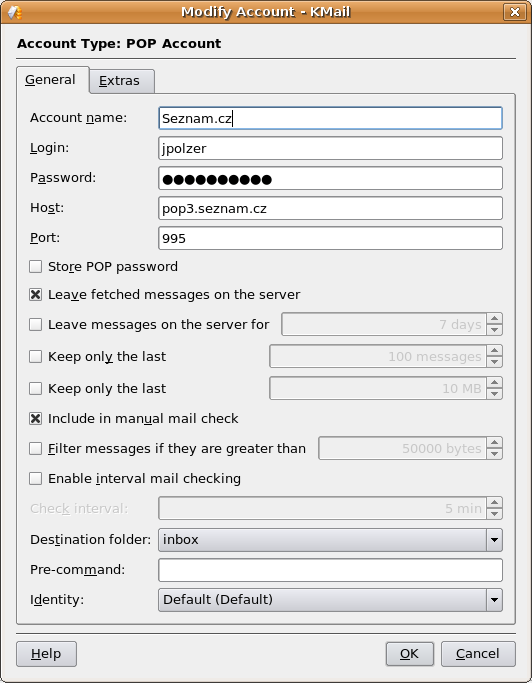
KMail account settings
Steps to backup KMail
Although the above solution works, it is not ideal. If you would like to sleep without worries about your mails, then follow these steps.
At first, check your ~/Mail directory. If it has exist before you started using the KMail, it is the directory you need to backup probably. However for the many other cases, you should check ~/.kde/share/apps/kmail directory too. There is also storage for the account information in this directory.
Note for Linux beginners: just remember, that the ~/ represents your home directory. Please, also note that the .kde directory (and any other directory starting with point) is hidden from common view.
So for the complete KMail backup just copy the directory mentioned above and burn it to the CD/DVD or copy it to external backup drive. You could also use a Linux backup software like Keep for comfortable backup of this KMail content.