
You are here

Home

Backup with Symantec Norton 360

Symantec utilities are well-known security software. However one of them, Norton 360, is not only security software. It is also a backup utility with ability to store your backup data using secure online storage. You can easily backup your pictures, documents, contacts, music, videos, emails, internet favorites and other files or folders. You have 2 GB space for your online backup, not too much. However you can backup to another disc or burn your data backup onto a CD/DVD too. 

Online backup with Norton 360 

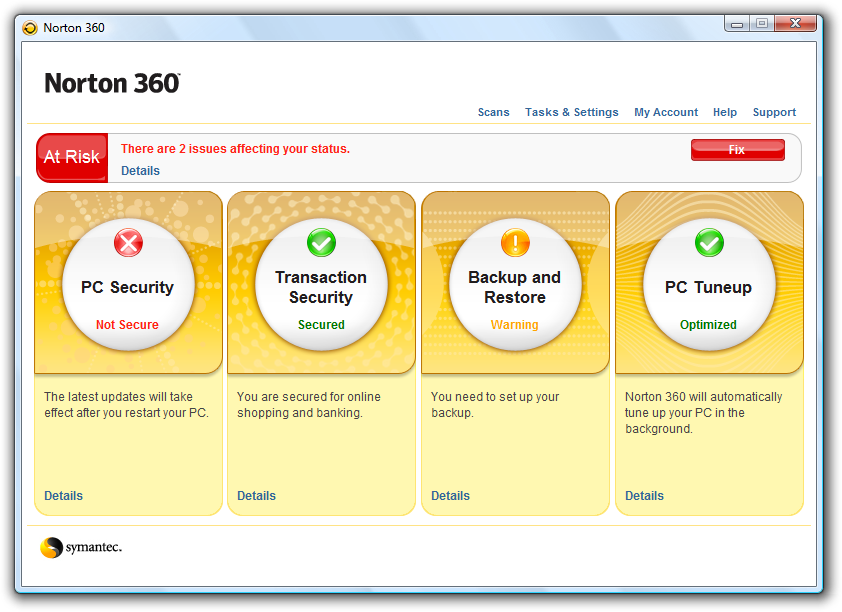
So at first you need to run Norton 360 application. The easiest way is to click on its link on your Windows Desktop. After the Norton 360 starts, click the Backup and Restore button in the application’s window.
Norton 360
Norton 360 – main window 

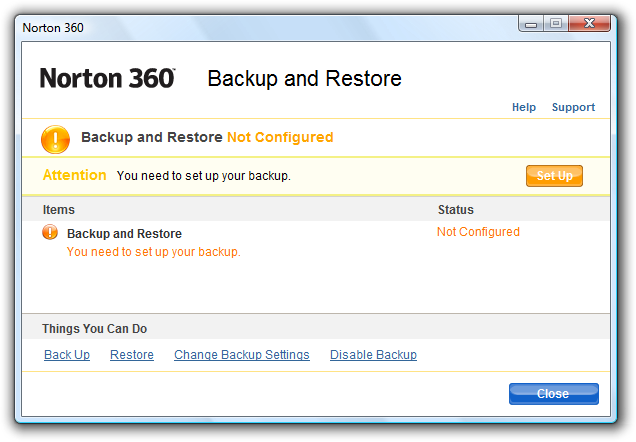
If you have not backup using Norton 360 yet, the application tell you that you need to set up your backup process. Take a look at the bottom of the window and click the Back Up link. 
Norton 360
Start your backup clicking the Back Up link 

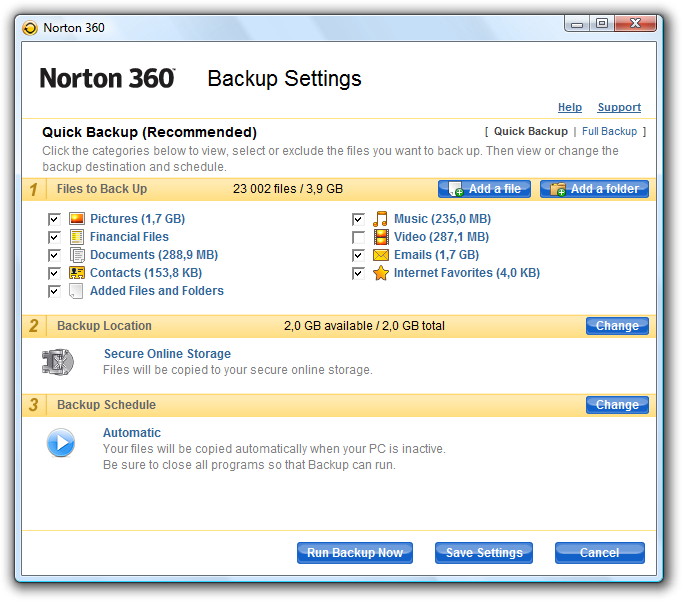
You should see a Backup Setting window now. There are three steps you should do. Select what you would like to back up. Check the size of selected items. Then click on the blue button called Change for backup location settings and in a dialog select Secure Online Storage. 

If this is your first use of Norton 360 and Secure Online Storage, you will be prompted for your e-mail and password for a Symantec account. After that you could use a Change button for setting up a backup schedule. 


Practice Safe Shopping with Norton

If this is your setting for usual backup, don’t forget to save this setting – just click the Save Settings button. 
Norton 360
Backup Settings window in Norton 360 

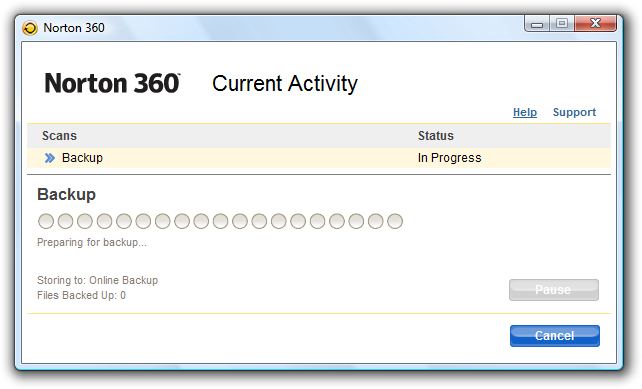
You are ready to start your online backup now. Click the Run Backup Now button and wait for completing the backup process. How long it will take? It depends on a size of your files for backup process. 
Norton 360
Norton 360 and backup process in action 
 

How to restore your files? 

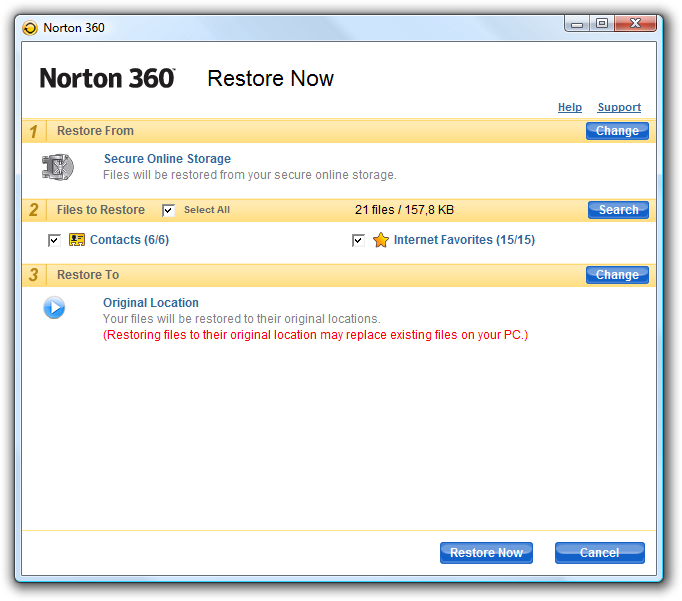
I hope your computer and system will work well for a long time. However something wrong could happen anytime. So if you need to restore you backup, run the Norton 360 window, click Backup and Restore button again and then click Restore link. The rest is similar to backup process.
Norton 360
Restoring files from Online Storage 

Select items you would like to restore, click the Restore Now button and wait until it’s finished. 

Norton 360 is interesting backup/security software. With Secure Online Storage it has a bonus value to its standard functions. Online backup is very comfortable process and if you select only very important items, the 2 GB size should be enough for your needs.

Comments below this article are closed. You can read and discuss below the article about newer version of Norton 360. Read more in Norton 360 4.0: web accessible online storage and Norton Tiki

Articles: 

Comments

can you restore from a diffrent computer? my mums comp was stolen and i need to restore her files

Jan Polzer's picture

Hi,the only things you need is username and pasword to your Norton Account.

Jan Polzer, Backup HowTo owner

How can i change tha account to logon to the backup ?

Jan Polzer's picture

Jan Polzer, Backup HowTo owner

Is it posible to change the accoun i use to backup ? My problem is tha i registered my brothers Norton 360 with my Norton account, now we can see each others secure store, can re-register his Norton so he has his own account ?

Jan Polzer's picture

I didn't try it, so I could not help more.

Jan Polzer, Backup HowTo owner

Few more features :

* PC Security with industry-leading virus, spyware, and firewall protection
* Identity Protection to protect against stolen logins and passwords, and phishing web sites
* Network Management to monitor security status across wireless and wired networks
* Automatic Backup to safeguard important files
* PC Tuneup to keep your computer running at peak performance
* One Click Support to solve problems quickly and easily

I bought the product yesterday and it ran backup last night.
I wanted to backup less than a meg of data.

It ran and failed, because it said I used over 2 GIG of data and it wanted me to BUY more.

Well, I tried to delete what I had backed up. I tried and tried and tried.

I was unable to delete even ONE file. It never finished. I tried to CHAT with support. I got on chat and the person NEVER answered me back.

Overall, a very, very poor showing! DO NOT BUY Norton 360!

Jan Polzer's picture

This is very strange. I have never contacted Symantec's support. Let us know if you will get answer to your problem. Thanks.

Jan Polzer, Backup HowTo owner

I have some old files backed up on Norton's secure on line storage that I would like to delete.
Does anyone know how to do this please?

Jan Polzer's picture

Hi, I'm affraid that the only way how to do this is to remove all files you backed up before.

  1. So double click the tray icon of Norton 360 and in the main window click Backup and Restore.
  2. Click Change backup settings link at the bottom
  3. Select Secure online storage and click Remove all backed up files
  4. After a while Norton 360 will show up a window with a list of computers you are using with this software
  5. Select a computer which backed up files you would like to remove and click OK

I hope this helps you. Currently I don't have an englisg version of Norton 360 installed, so I am not sure if all button and link name are the same as I wrote.

Jan Polzer, Backup HowTo owner

personally recommend Norton Internet Security 2007/8 over Norton 360. Its a ligher than 360 on the system. While it does not have a backup program, I do find the Norton backup program is quite slow and its pop-ups annoying and only slow a PC.

Jan Polzer's picture

So and what backup software could you recommend instead of Norton 360?

Jan Polzer, Backup HowTo owner

Dear Geniuses,

I tried to use the Windows Backup Restore after installing your product. XP no longer does the backup because of your product. I don't want to use your backup and you should have never let your product mess with the way I want to do things. I don't want online storage and I want to keep my files private.

Tell your boss to fix the problem and stop causing other problems.

Jan Polzer's picture

seems like we have someone here, who don't know what is talking about :-)

Jan Polzer, Backup HowTo owner

Jan Polzer's picture

Thanks for the tip. I will try it.

Jan Polzer, Backup HowTo owner

i make a back up of my files with norton 360 then i restore my pc to its original then i install norton 360 again but when i put the discs were the backups are and in norton a put restore files it does not appear nothing waht can i do ?

I just bought a new computer and have to install my old files on to the computer. I am not using Norton 360. How do I add files that are backed up to this new computer.

Jan Polzer's picture

Hi, you mean how to restore files backed up with Norton to the PC without Norton 360? If this backup is located on the discs, then try to move it manually, if the backup is located on Symantec Online Secure Storage, you have to install Norton 360.

Jan Polzer, Backup HowTo owner

Jan Polzer's picture

Hi, try to copy them manually.

Jan Polzer, Backup HowTo owner

My pc had to be restored completely! re installed windows and all. I have all my files backed up with norton 360 but on cd's how do i restore these files?

Jan Polzer's picture

Hi Sara,
it should be very easy. Take a look at the article above. In the Restore Now windows check the step 1. If there is not your CD/DVD drive, then click the Change button and select it. Select which files you would like to restore and continue with Restore Now button.

Jan Polzer, Backup HowTo owner

same thing happened to me. keeps telling me to buy more... it's not good.

It stopped at 2GB because that is the limit of the free online storage. You should backup onto an external hard drive and you can backup to the limit of the drive. Why anyone wants to backup to online storage puzzles me. Norton wants you go that way so they can sell you more storage. Backup to a hard drive and you will have no problems.

Jan Polzer's picture

Online backup couldn't be damaged by a fire in your house, for example. And it is a little bit more comfortable for traveling people, I think.

Jan Polzer, Backup HowTo owner

I keep getting the orange exclamation point indicating something isn't right w/ norton. I get nervous and it turns out it's just for the backup, saying "You have low storage for online backup, please add more storage." I have since changed where I backup my files to (now they're going to my external hard drive) I don't want to buy more storage and I want that orange exclamation point to go away. Is there a way to do this? thank you!

Jan Polzer's picture

Hm, I don't know. For me, it's still there saying that I have to remove temporary internet files.

Jan Polzer, Backup HowTo owner

I use that too! Feels like it runs a little better than Norton. The interface is easier to navigate too.

I currently use Acronis for full system backups. Norton 360 looks like a good option for select backups, but 2 gb is not enough for me. In pictures alone I have over 4 gb! Having two kids and a wife that loves to take pictures can create large backup problems.

Hi,

My computer went crazy this week and apparently, my hard drive is dead. My files were only backed up on Norton 360. The problem is that I can't access the restore page, all week, it said Authorization failed, try again later. Does anyone have the same problem or is it just me?

Jan Polzer's picture

Hi, try to send a new password to your e-mail.

Jan Polzer, Backup HowTo owner

Unfortunately, it is not working either and it says authorization failed...

Jan Polzer's picture

Are you able to login to your account with the same credentilas here https://www.mynortonaccount.com/ ?

Jan Polzer, Backup HowTo owner

I am running Norton 360's Restore feature as you mentioned in this article however, I am unable to restore from the backup DVDs from my clients computer. My clients PC's hard drive has failed but before doing so he has mentioned that he successfully made the backup to two DVD's with Norton 360. I have since reinstalled Windows and re-installed Norton 360 successfully on a brand new hard drive but when I try to select the DVD option from Norton's 360 Restore I get a general error;

"Norton 360 was unable to find a valid backup on the inserted disk, or no disk was present. Would you like to try again?"

Windows Explorer shows the DVD and I can view the N360_BACKUP folder with another folder which appears to be some long Hex number in between the brackets { and }. Deeper into the directories of the backup DVD there are more folders starting with {0, {1, {2, etc...

How can I restore my clients files onto the new hard drive? Anyone's help is greatly appreciated. I presume that these files are encrypted and that only Norton 360 will be able to restore them? Is the backup DVDs corrupted?

Jan Polzer's picture

Hi, maybe a stupid question from me, but is the DVD readable? Did you tried to copy all its files to the computer? It is the basic test of readability.

Jan Polzer, Backup HowTo owner

iI HAVE EXACTLY THE SAME PROBLE, NORTON IS UNABLE / UNVILLING TO FIX THE PROBLEM, THEY DO NOT ANSWER MY E-MAILS ANYMORE.
THE DVDS ARE REABLE, I CAN LIST THE CONTENT WITH FOLDER AND SUBFOLDERS ETC, I CAN SELECT WHAT I WANT RESTORED, BUT THE RESTORE PROCESS FAILS.

ANYBODY SMARTER THAN NORTON OUT THERE ??

I have exactly the same problem.
The DVDs are readable, I can list the content with folder and subfolders etc.
I can select what type of files i want restored but the restore process fail.

Hi Thanks for your replies. That is why I am trying to do right now. The DVD backup files are copying to the 2nd partition I have made on the hard drive. I will keep you guys posted to see if this step works. If not I will find out if I can initiate a remote desktop assistance if Norton Support has the ability to do so from Chat.
For anyone else for your info, I am running Windows XP Home edition with all the updates installed with SP3. Norton 360 is fully updated and and has all the green check marks in its fields.

I have copied both DVDs to the second Hard Drive partition but I am still unable to get Norton 360 to detect these files. I have noticed that Norton 360 creates two files backup.@db and a hidden *.DAT file named DiscID. It seems Norton 360 tries to look for either both of these files or one of them so that you can see the option to choose the backup files from the Hard drive. I find that upon when Norton 360 creates its backup it creates these files right after the N360_BACKUP directory.

In my case for example;
D:\N360_BACKUP\backup.@db
D:\N360_BACKUP\DiskID.DAT

When creating a backup that has to be spanned across multiple backup DVDs however, it creates a different path.

On DVD #1:
E:\N360_BACKUP\{0338B7BD-7F37-49D7-9F9D-9B8D03FFFB68}\DiskID.dat

On DVD #2:
E:\N360_BACKUP\{0338B7BD-7F37-49D7-9F9D-9B8D03FFFB68}\DiskID.dat
E:\N360_BACKUP\{0338B7BD-7F37-49D7-9F9D-9B8D03FFFB68}\backup.@db

Unfortunately, there is no option in the restore part of Norton 360 where I can "choose a path/directory" where my backup files are located. It will only show radio buttons to choose between the Hard drive, Backup DVD or the secure online storage after I click on the Change button.
Any insight on this issue would be greatly appreciated. Thanks.

In the mean time a quick Google search on these types of Norton backup files turns out to be pointer files to where you can locate them but in this guys case in the link:

http://norton.lithium.com/norton/board/message?board.id=Norton_360&threa...

The end result was that he was in contact with Norton Developers and they used a tool to recover the files one by one. Does anyone know where I can locate or obtain this recovery tool?

If not at this point I will be contacting Norton Online support right now to find out if they can fix this for me.

Jan Polzer's picture

This is crazy :-( I'm starting to afraid if my backups will be usable if really needed :-( Let us know if you will go to a successful end.

Jan Polzer, Backup HowTo owner

Yay! Managed to figure this one out on my own.
Turns out that when my client created the DVD backups he did so on the updated version of Norton 360 Version 2.
I was trying to restore the files using Version 1.
If you still have an active license with Norton 360 version 1, It is recommended to use Norton's Removal tool to uninstall Norton 360 version 1 first. The removal tool can be located here:

http://service1.symantec.com/SUPPORT/tsgeninfo.nsf/docid/200708071622343...

Then you can update to the newest version by downloading the following Norton 360 file here:

http://liveupdate.symantec.com/upgrade/N360S200.exe

I have also noticed a pattern on how the backups are recovered that are spanned across multiple CDs/DVDs. It is important that Norton 360 locates DiskID.DAT file and backup.@db file in the same path. You should see both of these files stored on the very last cd/dvd backup copy you have. In my case it will be on the 2nd DVD. If you have made copies that spanned across 3 DVDs for example, then you will see both DiskID.DAT file and backup.@db file on the 3rd DVD.

Once you have version 2 of Norton 360 installed and updated, put in the last CD/DVD backup and Norton 360 will check the disk then ask for the first CD/DVD backup. From there it will start to restore your files and will ask for the 2nd, 3rd, 4th, etc... CD/DVDs inclusive.

Another way to tell if your backups are backed up using Norton 360 version 2 is the nature of the directories themselves. Norton 360 version 2 backups will have the extra directory with the { and } with the long Hex numbers in between after the N360_BACKUP folder.

For example;
- Norton 360 version 1 backup path would be:
D:\N360_BACKUP\

- Norton 360 version 2 backup path would be:
D:\N360_BACKUP\{0338B7BD-7F37-49D7-9F9D-9B8D03FFFB68}\

I hope this helps for everyone especially FMANN as this has worked for me. :)

Jan Polzer's picture

Thanks for sharing Max, nice post!

Jan Polzer, Backup HowTo owner

I first downloaded norton 360 on my hard drive. Ive done back ups and whatever for the past year. Now my hard drive has crashed is not even readable. I installed a new hard drive but where is all the data that it said was stored with norton 360. Is it online. PLEASE HELP!!!!!!!!!!!!!!!!!!!

Jan Polzer's picture

It depends what location did you choose. If I am not wrong, the online storage is not the default one. I hope you didn't backup to the same drive...

Jan Polzer, Backup HowTo owner

The default backup location for N360 should be Online. In order to restore your data you will need to reinstall N360, click on Restore Files, and then at the top where it says 1. Restore From find the Change button over on the right. Once you click Change you should see a listing of a couple of Online Storage locations. Pick the one that corresponds to your old PC name (if you don't know you can just pick one and see which files are available for restore). This should give you access to your old online backups.

I tried to add and to remove some files and folders from the backup set. Now hardly anything is set to backup and there are grey indicators over every file icon. Short of reinstalling, does anybody know how I can reset to the original default backup setings?

I am having similar problems:
1) Gray indicators on some files.
2) Selected files are not being backed up.
3) I cannot remove files from the backup list either through Norton 360 or Windows Explorer.

Support has reinstalled several times and cannot figure it out either. They said they would report it to Symantec and I have heard nothing.

Advantages of Norton is really appreciable. Thanks for providing! I also want to share my antispyware www.search-and-destroy.com which I have explored, I got true results, promise it will assist you more.

Well, I get nervous and it turns out it's just for the backup, saying "You have low storage for online backup, please add more storage." I have since changed where I backup my files to (now they're going to my external hard drive) I don't want to buy more storage and I want that orange exclamation point to go away.

Pages

User login
Recent comments

BackupHowTo Tweets