
AUTHOR
Articles by Jan Polzer
Jan Polzer is a web developer and technology journalist who has written about computers and data protection for over 20 years, including eight books and hundreds of articles. On Backup HowTo he focuses on tested, practical backup and recovery advice — reviewed and updated as tools change.
CLOUD
Norton 360 4.0: web accessible online storage and Norton Tiki
Security and backup application Norton 360 from Symantec brings in its 4.0 version some new features. Since we are website about data backup, the most important news in Norton 360 4.0 for us is the web access to secure online storage. You can also download and search your files via the smartphones and the small appl…
CLOUD
How to use Acronis True Image Home 2010 with online backup storage
Acronis True Image Home 2010 comes with a new feature saving your data to a secured online storage. This nice backup imaging software extends its functionality and starts to be a competitor in online backup services. Moreover, there is also new product Acronis Backup and Security which offers backup functionality to…
HARDWARE
How to backup and restore your data on Lenovo IdeaPad Y550 notebook
Lenovo IdeaPad Y550 is a nice laptop for home use at first. It is good for movie watching, games playing, internet browsing and so. But this article is not a review of IdeaPad Y550. I would like to share a few information about the software equipment of this Lenovo’s laptop, especially how it do backups of your data…
FIREFOX
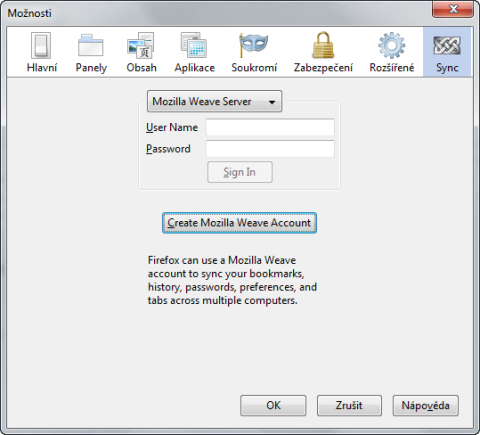
Mozilla Weave Sync: how to backup and synchronize your Firefox
A few days back the Mozilla Foundation released their long awaited Firefox extension called Weave Sync in its first stable version. Thanks to Weave Sync there is no need to think about how copy Firefox settings and data between two or more installations or how to securely backup them.
WINDOWS
Backup4All Professional 4.3: backup solution for beginners
Are you looking for powerful yet easy to use backup application which works at files and folders basis? So you can try the Backup4All. It offers files and folders backup. You can use other folders, external drives, CD, DVD, Blu-ray, network, FTP or SFTP servers as storage for your backup. You will like its plugins philosophy saving you time and doesn’t require advanced knowledge.
IPHONE
CopyTrans 4: transfer iPod to iTunes/iPhone to computer
Have you ever lost your computer, had it stolen or accidentally erased your computer’s music? In those times, you’d probably wish you could recover your music from your iPod or iPhone! Fortunately I’m presenting you with the solutions that will allow you to do just that! Super easy, hassle free: CopyTrans 4!
LINUX
How to backup with Ubuntu One and get 2 GB storage free
Popular Linux distribution Ubuntu offers from version 9.04 integration with interesting online backup service called Ubuntu One. After the subscription, you will get 2 GB secure online storage for free; much larger 50 GB storage is available for a small yearly fee. So how to backup with Ubuntu One?
WINDOWS
How to backup registry in Windows 7?
Why you should backup registry? Every time you install a new application or game to your computer you risk. You risk the incompatibility with the current registry keys made by other applications. The same applies for running some cleaning software. Since the registry backup is very easy in Windows 7, you are a step away from keeping your system in a good condition.
WINDOWS
How to backup Nokia 5310 XpressMusic using Nokia PC Suite
You just bought your new Nokia phone. Now you will start taking photos and videos, you will create some new contacts and calendar events. If you will lose the phone, you will lose all this data - and it could be very annoying. However there is a solution how to prevent the loss of contacts, messages, music, photos or videos. The solution calls Nokia PC Suite and I will show you how to work with this software together with Nokia 5310 XpressMusic phone.
ANDROID
How to backup Android (and HTC Hero) phone
A few days back I’ve got my first Android powered phone – HTC Hero. I have to say, it is much better than my Windows Mobile HP iPAQ 514 Voice Messenger. However I am not sure what is better – the touch screen or the Android system itself? Being the responsible user I immediately started searching the backup applications through the Android Market. There are the results.
PHOTOS
Verbatim PhotoSave DVD: how to backup your photos in three easy steps
I don’t remember how long time ago Verbatim released its nice tool for Windows beginners worldwide, but my first look at this DVD was about a half year ago. Verbatim PhotoSave DVD is a special blank 4,7 GB DVD medium which contains a backup software for the photos and other pictures in your computer. As it works with three clicks, it is ideal for the beginners or for not so advanced users.
IPHONE
First and only backup for iPhone OS 3.0
A few days back we could see a new operating system for the iPhone and iPod Touch. This new iPhone OS 3.0 will be presented in a new iPhone 3GS and is available for current iPhone 3G owners for free. If you are using the iPod Touch, you can upgrade its OS to this new one for a small fee. But what about the data backup? There is about twenty competitors in iPod backups market, but the only one has the support for iPhone OS 3 as I know. Read more about CopyTrans 6 and CopyTrans Photo.