Firefox has numerous add-ons and third party apps helping you back up its user profile. This contents your browsing history, cookies, stored passwords and other information about your Internet browsing. If you want to back up Firefox profile from Windows command line, try BAT file named Batckup Firefox.
Batckup Firefox works with a simple premise. It assumes your Firefox profile on Windows installation is located in %user-profile%\AppData\Roaming\Mozilla\Firefox\Profiles, where %user-profile% is usually C:\Users\your-name folder. With this knowledge it copies all its content out using the xcopy command line tool.
So using the Batckup Firefox is as simple as double clicking the downloaded BAT file. It will show up the command line windows and prompt for destination folder for your Firefox profile backup. If you just hit the Enter key without specifying anything, the Firefox profile backup will be copied to the new folder on your Desktop.
Batckup Firefox remembers the destination last specified – at least until you keep the file config.dz created in the same location where you started Batckup Firefox from.
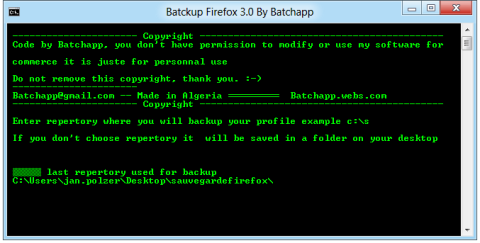
Batckup Firefox
Restoration of this Firefox profile backup is very simple. Just copy the content of the new folder on your Desktop back to the %user-profile%\AppData\Roaming\Mozilla\Firefox\Profiles.
If you prefer graphical utilities with more settings, you can check our articles about MozBackup application or FEBE backup add-on for Firefox.