
GUIDES
iPhone
How to back up an iPhone or iPad to iCloud, iTunes or your computer — and how to restore it.
IPHONE
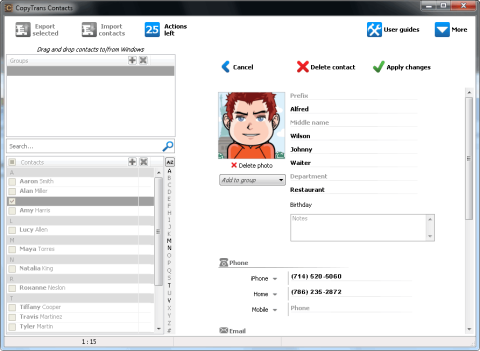
CopyTrans Contacts: how to backup iPad and iPhone contacts
The new app from CopyTrans offers simple edition and backup your iPhone contacts, also iPad or any other iOS device without iTunes or iCloud.
IPHONE
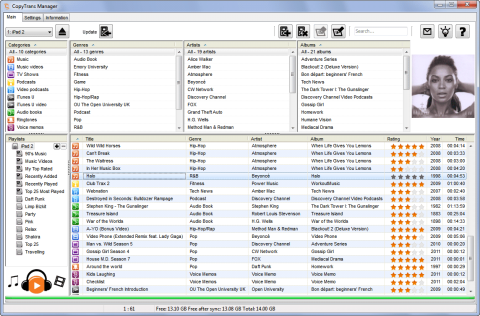
How to Transfer and backup Apps from your computer to iPhone or iPad without iTunes
Do you need to backup the iPhone or any other iOS powered device? You can use the default software from Apple – iTunes. There are also some alternatives. CopyTrans Manager for example. Its newest version supports drag and drop and besides the music and photos also supports the apps.
IPHONE
CopyTrans Manager: first free iTunes compatible with iOS 5 and iPhone 4S
If you are regular reader of Backup HowTo, you surely know the CopyTrans Manager, the freeware alternative to iTunes. Now, there is a good news for users who upgraded to iOS 5 or just buying the new iPhone 4S. CopyTrans Manager is now compatible with them.
IPHONE
How To Speed Your iPhone’s Back-up Process: Is your iPhone backing up too slow? Let’s speed it up!
Are you an Apple or Windows user who hates the hassle of backing up his or her iPhone? I know I do, it can be a real pain, but there is a glimmer of hope for all of us. Sometimes we just need to learn to let go of certain files in the backup process even if we want them, but if they’re not used, what’s the point? He…
IPHONE
How to turn off iPhone, iPod Touch or iPad backup in iTunes
Sometimes the backup functionality built in Apple iTunes is not welcome when you connect your iPhone, iPod Touch or iPad to the computer. In this case you will find useful small app which is able to completely turn off syncing and backup in iTunes.
IPHONE
CopyTrans 4: transfer iPod to iTunes/iPhone to computer
Have you ever lost your computer, had it stolen or accidentally erased your computer’s music? In those times, you’d probably wish you could recover your music from your iPod or iPhone! Fortunately I’m presenting you with the solutions that will allow you to do just that! Super easy, hassle free: CopyTrans 4!
IPHONE
First and only backup for iPhone OS 3.0
A few days back we could see a new operating system for the iPhone and iPod Touch. This new iPhone OS 3.0 will be presented in a new iPhone 3GS and is available for current iPhone 3G owners for free. If you are using the iPod Touch, you can upgrade its OS to this new one for a small fee. But what about the data backup? There is about twenty competitors in iPod backups market, but the only one has the support for iPhone OS 3 as I know. Read more about CopyTrans 6 and CopyTrans Photo.
IPHONE
Try new freeware alternative to iTunes
CopyTrans team released a new CopyTrans Manager. Another software from this vendor is well known to all BackupHowto.info readers. Using the CopyTrans software you can backup all the data from your iPod without installing the iTunes software. Check the video showing up the new CopyTrans Manager. It's not a backup tool, but I think it could be interested for you. It's an iTunes alternative (or iPod/iPhone manager) that enables iPhone and iPod users to add music, videos, podcasts to their favorite devices. Copytrans Manager also allows to create and manage playlists,edit song tags, play music and display artworks to name a few.
IPHONE
CopyTrans 3 is out: backup for all iPod players and iPhones
I mentioned the previous version of CopyTrans earlier this year. This unique backup solution for iPod and iPhone owners offers great and simple way to backup all your data from these players and phones. Now, the new better version is available.
IPHONE
How to backup iPhone and iPod: CopyTrans as a complete solution
Data loss is a very annoying situation. Your computer has crashed or your external drive needs maintenance, how will you get your favorite songs and videos back? That is why iPhone and iPod backups are necessary.
IPHONE
How to backup iPhone
If you want to backup your iPhone, because you dare to lose all your information and make your iPhone into a useless element normally if things go off beam, the worst that will happen is that you have to restore your iPhone to its initial pristine state. That means that you’d lose your settings and data on the iPhone. So before you loose your iPhone, make sure you save off your data by doing simple steps.
iPhone and iPad backups
You can back up to iCloud, to a computer or to both. These guides walk through each option and how to restore your data to a new device.